Which Claude do I use?
And how do I make it know my business?
The sheet we give every client. Four models, one effort dial, three ways to load your business in. Save it, share it, argue with it. Updated 9 Sep 2026.
01 · The four models
Haiku 4.5"the sprinter"
Near-instant and the cheapest. Use it when the task is mechanical and volume is high.
- Sorting & tagging anything
- Pulling data out of emails/PDFs
- Meeting notes → summary
- Quick lookups & drafts
Sonnet 5"the workhorse"
The everyday default. Best smarts-per-dollar for 80% of real work.
- Client emails & documents
- Everyday coding
- Research & analysis
- Website & marketing copy
Opus 5"the heavy lifter"
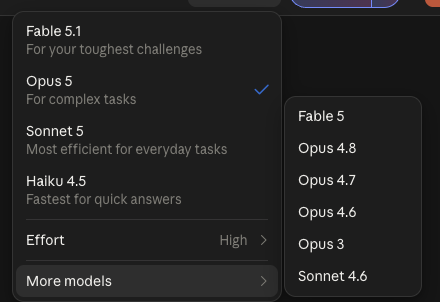
Opus 4.8 is our stable pick. Still in the picker under More models, and it has not surprised us on a long run. Opus 5 is the newer, most capable one: sometimes the best of the four, sometimes it trails off before the job is done. Both read entire codebases and contract stacks at 1M-token context.
- Complex code & refactors
- Long documents, many files
- Proposals that must land
- Judgment calls with nuance
Fable 5.1"the frontier"
The newest flagship family. Hardest reasoning, longest agent runs, best taste.
- Strategy & pricing decisions
- Agents that run for hours
- Gnarly multi-step problems
- "This really matters" work
House rule: start on Sonnet. Drop to Haiku the moment the task feels mechanical. Escalate to Opus or Fable when being wrong is expensive, a lost client or a broken deploy. For a long unattended run, Opus 4.8 is the one that has not surprised us.
02 · The effort dial (most people never touch it)
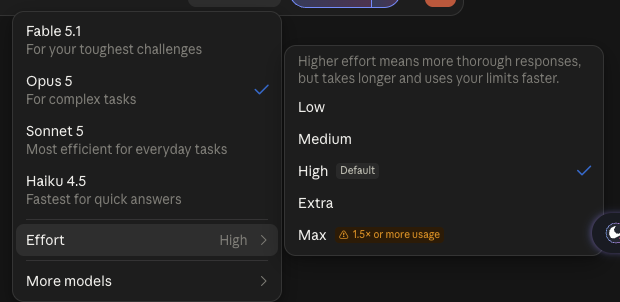
Every model also has an Effort setting, five steps from Low to Max: how long it reasons before answering. Low = instant answer. High = it works the problem first, and it is the default. Max uses 1.5 times your limits or more. This changes results more than most model swaps.
| Effort | When | Feels like |
|---|---|---|
| LOW | Lookups, rewrites, formatting, anything you'll check yourself | A fast colleague answering from memory |
| MEDIUM / HIGH / EXTRA | Debugging, planning, maths, anything multi-step | Someone taking a walk to think it through first |
| MAX | The genuinely hard stuff, let it grind | A specialist locking the door for an afternoon |
Cheat: a mid model on high effort often beats a big model on low effort for puzzles and debugging. But for taste, writing, strategy, judgment, the bigger model wins even on low. Puzzle → effort. Taste → model.
Where it lives: claude.ai → the model picker beside the message box → Effort → Low, Medium, High, Extra or Max · Claude Code → type /model → pick model and effort
Where it lives: claude.ai → the model picker beside the message box → Effort → Low, Medium, High, Extra or Max · Claude Code → type /model → pick model and effort
03 · Teach it your business (this is the unlock)
STEP 1Make a Project, load your goldIn claude.ai: sidebar → Projects → new. Upload your website copy, your 2 to 3 best proposals, 5 real customer emails. Then set instructions: "Write like these examples. This is our tone, our offer, our prices." Every chat in the project now knows your business.
📁 Projects+ Add to project knowledge⚙ Set custom instructions
STEP 2Connect your real toolsSettings → Connectors. Plug in Gmail, Drive, Calendar (and any MCP tool your systems expose). Now it answers from your actual emails and files: "Summarise every open quote from this month's email."
🔌 ConnectorsConnected: Gmail🔍 Search & tools
STEP 3Show, don't describeThe 3-example rule: paste two or three gold-standard outputs before you ask for a new one. Models copy patterns far better than they follow adjectives. "Professional but friendly" loses to three real examples, every time.
Here are 3 quotes we actually sent and won.
Match their structure, tone and length.
Now write one for: [new client details]
04 · When to use what, pin this bit
| The task | Model | Effort | Plus |
|---|---|---|---|
| Label / sort / extract from 1,000 things | Haiku 4.5 | LOW | Clear format example |
| Reply to a customer email | Sonnet 5 | LOW | 3 past replies as examples |
| Write a proposal or quote | Opus 5 | MEDIUM | Project with your winners loaded |
| Debug code / fix a spreadsheet formula | Sonnet 5 → Opus 5 | HIGH | Paste the error, not a description |
| Read a 100-page contract / whole codebase | Opus 5 | MEDIUM | 1M context, give it everything |
| Pricing, strategy, "what should we do?" | Fable 5.1 | MAX | Real numbers in, always |
| An agent that works for hours unattended | Fable 5.1 / Opus 5 | HIGH | Connectors + tight instructions |
| Meeting → summary → action list | Haiku 4.5 | LOW | Your action-list template |